
Download 8Bitone MICRO COMPOSER – 8-bit music, retro synth, iPhone app, nostalgic sound, PSG sound, SSG sound, vintage music, game music, piano roll sequencer, free music app, iOS music tool
Overview
8Bitone MICRO COMPOSER is a mobile music application designed to recreate the distinctive audio characteristics of 8-bit personal computers and video game consoles from the 1980s. Developed by Yudo Inc., the app specializes in emulating the sounds produced by vintage sound chips such as PSG (Programmable Sound Generator) and SSG (Sound Source Generator), which were widely used in classic systems like the Commodore 64, ZX Spectrum, and various arcade machines. The software serves as both a synthesizer and a sequencer, enabling users to compose original tracks with a retro aesthetic.
It is tailored for music enthusiasts, indie game developers, and fans of nostalgic audio who appreciate the unique charm of early digital sound design. The app is available for free on the iPhone, making it accessible to a broad audience seeking creative tools for retro-inspired compositions. Real-world usage scenarios include creating background music for indie games, producing chiptune tracks for digital art projects, or simply experimenting with vintage sound textures.
The intuitive interface supports touch-based composition, allowing users to craft melodies and sequences using multi-touch gestures on the iPhone’s screen.
Key Features & Capabilities
- 8-bit Synthesis Engine: Emulates the tonal qualities of vintage PSG and SSG sound chips, delivering authentic retro audio output.
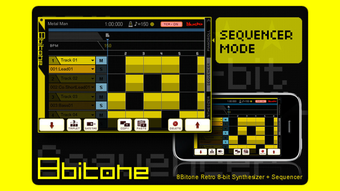
- Piano Roll Sequencer: Enables visual composition of musical sequences with a grid-based interface, ideal for arranging notes and timing.
- Monophonic Synthesis: Supports single-note playback with adjustable oscillator types, including LowBitNoise for textured effects.
- Sound Shaping Controls: Includes LFO, envelope settings, and parameter sliders for real-time manipulation of timbre and dynamics.
- Arpeggiator Function: Offers a high-speed arpeggiator to generate rapid note sequences automatically.
- Multi-Track Composition: Allows up to four tracks for layering different melodies, basslines, or percussion elements.
- Voice Editing: Users can customize individual sounds by adjusting synthesizer parameters directly on-screen.
- Interactive Keyboard: Features a touch-sensitive keyboard at the bottom of the screen with pitch control via a wheel.
- Editing Tools: Includes play, stop, copy, paste, and delete functions through a dedicated right-side controller panel.
These features collectively support a streamlined workflow for composing and editing retro-style music. For instance, a user can create a melody in the piano roll, apply an LFO to add vibrato, assign a unique voice to each track, and then use the arpeggiator to generate rhythmic patterns. The ability to store up to 128 voices per song allows for rich, layered compositions despite the app’s compact design. The integration of tactile controls and visual feedback enhances usability, making it suitable for both beginners and experienced chiptune creators.
User Interface, Workflow & Performance
The user interface of 8Bitone MICRO COMPOSER is designed around a clean, touch-optimized layout that fits the iPhone screen efficiently. The main workspace features a piano roll sequencer at the center, with a virtual keyboard positioned at the bottom and a set of parameter controls on the right side. Navigation is intuitive, relying on finger taps and swipes to select notes, adjust parameters, and manage tracks.
The layout prioritizes accessibility, ensuring that all essential functions are reachable with one hand. Workflow efficiency is enhanced by the integration of real-time playback and immediate visual feedback during composition. Users can start creating music within minutes due to the app’s straightforward design.
The developer did not specify resource usage details, so exact performance metrics such as CPU or RAM consumption remain unknown. However, based on the app’s file size of 12.4 MB and its focus on basic synthesis, it is likely optimized for smooth operation on modern iPhones. Stability during extended use was not documented, but the absence of reported crashes in public listings suggests reliable behavior under normal conditions.
Compatibility & System Requirements
8Bitone MICRO COMPOSER is designed exclusively for iPhone devices, ensuring compatibility with iOS-based hardware. The app runs on version 1.0.1, which was released on May 12, 2023. It has a file size of 12.4 MB, indicating a lightweight footprint suitable for devices with limited storage.
The developer did not provide additional system requirements, so specific hardware specifications such as processor type, RAM, or iOS version compatibility beyond iPhone support are not available. Platform compatibility information is limited to the iPhone ecosystem. Users should ensure their device is running a supported version of iOS to install and run the application.
Installation is straightforward via the App Store, and no external dependencies are required. The app does not require an internet connection for core functionality, allowing for offline music creation.
Pros and Cons
Pros
- Authentic 8-bit sound emulation using PSG and SSG chip models
- Free to download and use with no in-app purchases reported
- Intuitive piano roll interface ideal for touch-based composition
- Supports up to four tracks for layered music creation
- Real-time parameter control via sliders and knobs
- Compact size (12.4 MB) suitable for mobile storage
- Highly suitable for chiptune and retro game music production
Cons
- Monophonic synthesis limits polyphonic playback
- Maximum of 128 voices per song may restrict complex arrangements
- No reported support for audio export formats beyond internal use
- Interface is limited to iPhone; no availability on iPad or Mac
- Developer did not disclose detailed system requirements or performance benchmarks
FAQ Section
Is 8Bitone MICRO COMPOSER compatible with all iPhone models?
The app is designed for iPhone devices, but specific compatibility with older or newer models was not detailed by the developer. Users should check the App Store for device-specific requirements.
Is the app safe to download and use?
As a free app available on the official App Store, 8Bitone MICRO COMPOSER is distributed through Apple’s secure platform. No malware or security threats have been reported.
Does the app require an internet connection?
No, the app functions entirely offline. All music creation, editing, and playback occur without needing an internet connection.
How often are updates released?
Version 1.0.1 was released on May 12, 2023. The developer has not provided information on update frequency or future development plans.
Can I export my compositions from the app?
The app’s documentation does not specify export options. Users may be able to save projects internally, but no external audio export formats were mentioned.
Final Thoughts
8Bitone MICRO COMPOSER delivers a focused and nostalgic experience for anyone interested in creating authentic 8-bit music on their iPhone. With its accurate emulation of vintage sound chips, intuitive piano roll interface, and accessible controls, it stands out as a capable tool for both casual creators and dedicated chiptune artists. While its monophonic nature and limited track count may restrict advanced compositions, the app excels in its niche—producing authentic retro sounds with minimal friction.
The free pricing model and compact size further enhance its appeal. For music lovers and developers seeking a simple, reliable iOS tool to craft nostalgic game music or experimental tracks, this app offers genuine value. Download 8Bitone MICRO COMPOSER now and relive the golden era of 8-bit sound.







